
Product Management
This section handles inventory management, displays available products, and allows adding new items. Key features include viewing, editing product details, and creating products, groups, or services.
📌 Note: There are two ways to manage products and inventory: through the personal account or directly on the terminal. Since the personal account offers more advanced and flexible features, we recommend using this method. You can learn more about it in https://learn.psr-it.com/en/customers/section/dashboard/inv_c_product_catalog. However, if the personal account is unavailable or you need instructions for adding products via the POS terminal, detailed steps are provided below.
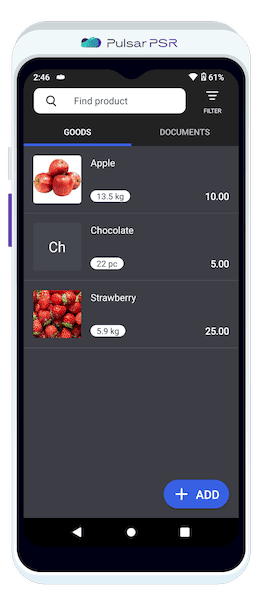
View all available products, check stock levels, prices, and quickly filter items in your inventory.
Product List
Each product entry includes:
- 🔹Image: A visual representation of the product (if enabled in Settings).
- 🔹Name: The product's name.
- 🔹Stock: Available quantity based on the unit of measurement.
- 🔹Price: Selling price displayed in the local currency, linked to the region selected during registration.
By clicking Find Product, you can filter through the added goods.
Filter Feature
The filter simplifies searching and categorizing products in the inventory.
Filter Menu: Tap the Filter icon to refine the product list based on specific criteria.
Search Field: Enter a product name, code, or article number to quickly find matching items.
Checkbox Options:
- 🔹Price Not Set: Displays products without a defined selling price.
- 🔹Product in Stock: Shows only products with available stock.
Tap Apply to update the product list.
Tap Reset to clear all filters and show all items.
Adding a Product
Open the "Products" section and tap "+Add".
A pop-up window will appear, allowing you to add a product using the barcode scanner. Tap "OK" to proceed or "Skip" to enter the product manually.
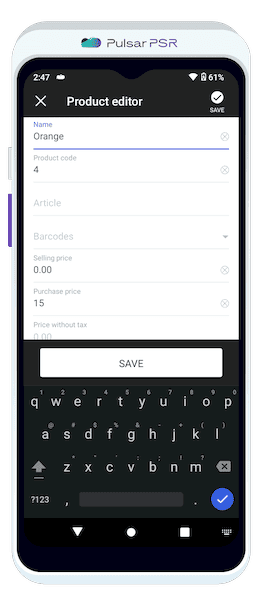
Fill in product details such as name, barcode, pricing, units, taxes, and assign it to a specific group.
In product addition mode, you can fill in the following fields:
- 🔹Name (required): The product name displayed in inventory and sales transactions.
- 🔹Product Code: A unique identifier for quick search and categorization.
- 🔹Barcodes: Barcodes can be scanned, entered manually, or automatically generated using the EAN-13 standard to streamline inventory management.
- 🔹Scan Barcode: Use the device’s camera to scan and register a barcode.
- 🔹Generate EAN-13: Automatically generate a standard EAN-13 barcode.
- 🔹Selling Price: The price at which the product is sold, displayed during transactions.
- 🔹Purchase Price: The cost price of the product, used for accounting and profit calculations.
- 🔹Price Without Tax: The product price excluding taxes, useful for accounting and reporting.
- 🔹Unit of Measurement: Defines the product’s unit (e.g., pc, kg, m, l), affecting inventory tracking and display.
- 🔹Description: A brief product overview, including key features or origin details.
- 🔹Product Group: Categorizes the product into a group for better organization and filtering.
- 🔹Type (required): Specifies whether the item is a product or a service.
- 🔹Tax Rate: Assigns the applicable tax rate (e.g., VAT 5%, VAT 10%) for tax-inclusive pricing calculations.
Save the entry.
Uploading Product Images
Enable product image display in https://learn.psr-it.com/en/customers/section/pos-terminal/pos_settings.
Upload images through the https://psr-it.com/en/dashboard/goods (web interface).
Wait for automatic synchronization (approximately 30 minutes) or manually trigger it via More → Exchange → Download to Terminal.
Managing Product Documents
- 🔹Inventory Checking: This feature enables users to conduct a stock count, ensuring that actual item quantities align with recorded inventory levels.
- 🔹Acceptance and Reassessment: Facilitates the registration of goods upon receipt and the creation of reassessment reports.
- 🔹Return to Supplier: Records and manages the return of defective, damaged, or unwanted goods to the supplier.
- 🔹Product Write-offs: Facilitates the removal of expired, damaged, or unsellable stock from inventory records.