
Reports
Cashier's Report
The Cashier’s Report provides a structured overview of shift-related financial activities, ensuring accurate cash flow tracking and accountability. It includes key details on sales, returns, and cash drawer management.
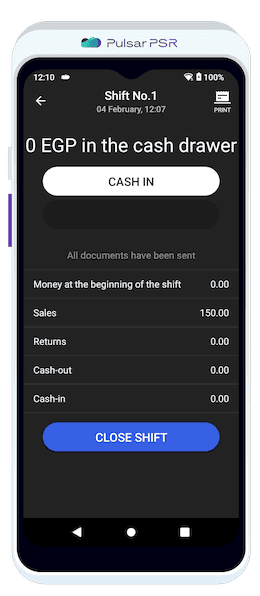
View financial details for shifts including opening balance, total sales, returns, and cash transactions.
The report includes essential financial data for the current or most recent shift:
- 🔹Opening Balance: Initial cash amount in the drawer at the start of the shift.
- 🔹Sales: Total revenue generated during the shift.
- 🔹Returns: The value of all processed refunds.
- 🔹Cash-Out: Amount withdrawn from the cash drawer during the shift.
- 🔹Cash-In: Additional cash added to the drawer.
Document Log
The Document Log provides a complete chronological record of all activities performed on the POS terminal during a shift. This ensures transparency, traceability, and efficient transaction monitoring.
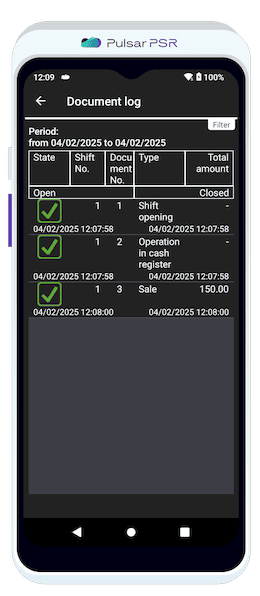
Track and filter all POS terminal activities such as sales, returns, and cash operations chronologically.
Advanced filtering and activity tracking easily locate specific records using:
- 🔹Period Selection: Filter logs by predefined or custom time frames (e.g., "Last 7 days").
- 🔹Document Type: Sort activities by category, such as sales, returns, or shift operations.
- 🔹Shift Openings/Closures: Records each cashier’s working session.
- 🔹Sales & Returns: Tracks every completed sale or refunded transaction.
- 🔹Cash Register Operations: Logs cash-in and cash-out activities for accountability.